Work Hours
Monday to Friday: 10.00 - 19.00






Automation often enters the conversation through a small irritation. A task keeps returning, an approval holds up the same process every week, or someone sees a tool that appears capable of taking the work away.
Those are useful signals. They are still only a starting point.
A task can repeat often and remain a poor candidate for full automation. The inputs may be inconsistent, the exceptions may carry real consequences, or the process may depend on judgement that nobody has documented. At the other end of the spectrum, a simple rule can remove hours of routine work when the path is stable and the outcome is clear.
The first automation decision is therefore about the work. The tool belongs later in the discussion.
This applies to a cloud automation strategy as much as it does to a business workflow. A restart rule, deployment pipeline, access request, invoice check and internal knowledge search all need the same foundations. Teams must understand what repeats, what can go wrong, where people need to stay involved and how the result will remain visible once the work runs in the background.
A July Reuters report on SAP’s second-quarter results captured the same direction in enterprise AI. SAP CFO Dominik Asam argued that value needs to move beyond chatbots into governed systems embedded in business processes, where clean data, reliability and cost control matter. His comments represent one executive view, while the underlying design questions apply much more broadly.
1. Start with work worth improving
Repeated work is the easiest place to look, although frequency alone does not make a strong automation case.
Consider a task that takes two minutes. If one person completes it twice a month, building and maintaining an automation may cost more than the task itself. If ten people repeat it several times a day, the same task becomes a meaningful source of delay, interruption and inconsistency.
Look beyond the time spent on each step. The real friction often sits in the hand-offs around it. Someone waits for information, copies it between systems, checks whether a request is complete, asks for clarification and then updates another person. The visible task may take two minutes while the full workflow stretches across a day.
Map that workflow as it operates now. Record the trigger, the information it uses, each decision, the systems involved and the expected result. Include the awkward paths as well as the ideal one. Teams often discover that different people complete the same process in different ways, or that an apparently simple task depends on knowledge held by one person.
A useful candidate usually has several of these characteristics:
- It happens often enough to create measurable effort or delay.
- The team can define the inputs and expected output.
- Most cases follow a stable path.
- The workflow can recognise exceptions and route them somewhere sensible.
- The team can check the result against a clear operational or business outcome.
- The value of removing the friction justifies the cost of building, securing and maintaining the automation.
Poorly understood work needs attention before automation. Automating a confused process can make it faster without making it better. It can also hide the confusion because the task stops appearing on anyone’s list.
The same principle applies in infrastructure. Before automating a recurring recovery action, establish why the incident happens, which conditions make the action safe and when repetition should trigger investigation. Recovery can protect availability while still leaving the underlying problem in place.
2. Decide how much autonomy the work can support
Once the workflow is clear, the decision goes beyond whether a team can automate it. Teams need to decide how much freedom the automation should have.
Three factors make that decision more concrete:
- Predictability: How consistently do the same inputs lead to the same decision?
- Consequence: What could the action affect if it is wrong?
- Reversibility: How quickly and completely can the team undo the result?
These factors lead to four practical levels of automation:
Situation |
Appropriate approach |
|
Predictable, lower consequence and easy to reverse |
Automate |
|
Predictable, higher consequence or harder to reverse |
Automate with approval |
|
Less predictable, lower consequence and useful for learning |
Assist and learn |
|
Less predictable, higher consequence or difficult to reverse |
Keep human-led |
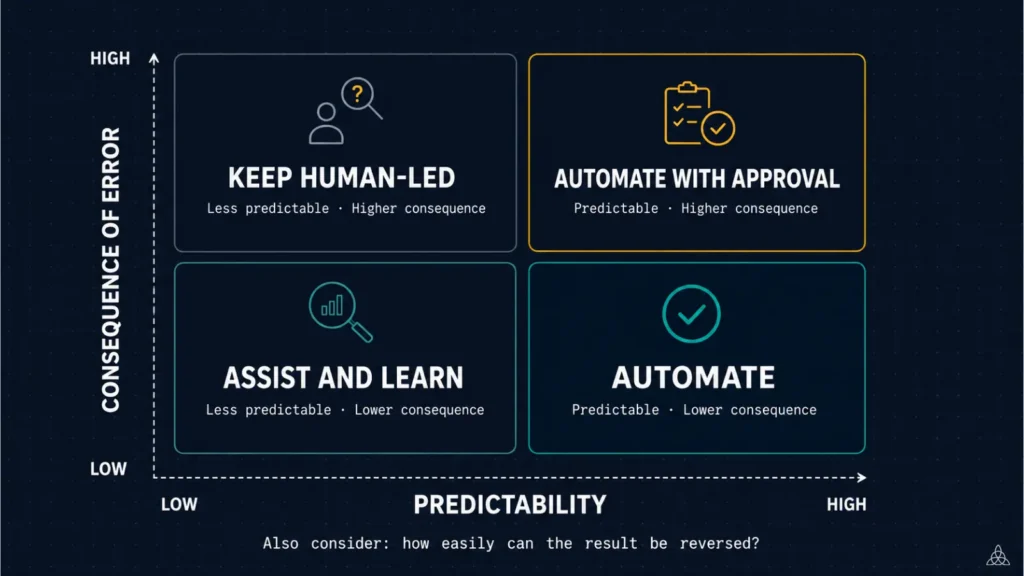
Choose the level of automation based on predictability, consequences and reversibility.
A stateless worker that restarts after a well-tested health condition may run automatically. A production permission change can follow a standard workflow and still require approval because the consequence is higher. An AI system can help classify low-risk support requests while uncertain cases return to a person. A decision involving ambiguous evidence, customer money or sensitive access may need to remain human-led.
Reversibility deserves explicit attention. A wrong draft that someone reviews before sending creates a different risk from a wrong action that deletes data, changes production access or commits funds. A workflow may look predictable while its consequences justify a much tighter boundary.
Current enterprise AI research points in the same direction. Deloitte’s 2026 State of AI in the Enterprise describes advanced organisations redesigning workflows so AI can handle suitable execution while people focus on judgement, exceptions and oversight. The design starts with the workflow and human role. Model selection follows.
Singapore’s updated Model AI Governance Framework for Agentic AI makes the assessment even more practical. Its case studies use the severity of impact, reversibility and feasibility of human oversight to set different levels of autonomy. Low-risk, reversible actions can run automatically. Actions with greater impact may need approval or remain outside the agent’s authority.
This risk-based approach works beyond agentic AI. It gives teams a useful way to assess cloud operations automation, DevOps automation and routine business processes with the same discipline.
3. Build the human and technical boundaries
An automated workflow still needs a path for the cases it cannot safely complete.
Define that path before launch. Decide which conditions need approval, which exceptions go to a person, how many times the system can retry and what happens when an integration stops responding. A useful exception path includes enough context for someone to act. Sending a generic failure alert only moves the investigation to another place.
Human involvement should match the risk. Requiring approval for every routine action can create alert fatigue and turn a useful automation into another queue. Allowing a high-impact workflow to run without a checkpoint creates the opposite problem. Place approvals where a person can make a meaningful decision, then give that person the information needed to make it.
The technical boundaries matter just as much:
- Data: Is the source reliable, current and appropriate for this use?
- Integrations: What happens when an API changes, times out or returns incomplete information?
- Identity: Can logs trace the system’s actions to a distinct identity?
- Permissions: Does it have only the access required for its task?
- Credentials: Where are keys and tokens stored, rotated and revoked?
The NIST concept paper on software and AI agent identity and authorisation frames these as practical security questions. It covers identification, authorisation, auditing and controls for agents that access data, tools and applications. The paper remains an initial public draft. Teams can use it to inform design without treating it as a final standard.
Least privilege gives each automation the minimum access required to complete its task. A cost-reporting workflow may need to read billing and usage data without gaining permission to create resources. An internal knowledge assistant may search approved documents without reading private conversations. A deployment workflow may operate in one environment while production changes still require a separate approval.
Credentials also need their own controls. Keep them out of source code, scope them narrowly and prefer short-lived credentials where the platform supports them. TardiTech’s SecretScan can help identify exposed keys, tokens and credentials in public GitHub repositories and commit history. If a scan finds an exposed credential, revoke or rotate it and move the replacement into a proper secrets-management process.
These controls are part of reliable automation design. Our Security and Compliance Consulting and DevOps and Platform Engineering Consulting work applies the same principles across access, delivery workflows and cloud environments.
4. Make the automation visible, owned and stoppable
Automation removes routine execution from a person’s list. It should not remove evidence of what happened.
Logs need to show what triggered the workflow, which information it used, what action it took and whether that action succeeded. For higher-risk processes, record approvals, exceptions and changes to the automation itself. Choose detail that will help during an incident, review or audit.
Execution logs tell only part of the story. Teams also need visibility into the effect of the workflow. A recovery rule may report successful restarts while the same service continues to fail. A deployment pipeline may complete faster while rollback rates rise. An AI-assisted process may close more requests while sending more uncertain cases to the wrong team.
Cost belongs in the same evidence loop. Autoscaling, scheduled jobs, pipelines and AI workloads can increase usage without anyone making a conventional purchase. The FinOps Foundation reported in February 2026 that 98% of FinOps practitioners now manage AI spend, up from 31% two years earlier. As automated activity expands, teams need to connect usage changes to the services, workflows and owners behind them.
UmbraFin supports this investigation by bringing current cloud cost, usage trends and ownership visibility into one place. That visibility helps a team see where to look when automated activity changes spend. The owner still decides whether the team expected the change and whether it supports a worthwhile outcome.
Every production automation needs a named owner. That person or team should understand:
- What outcome the workflow supports
- Which systems and data it can access
- Where failures and exceptions appear
- Who can approve or change its behaviour
- How to pause, roll back or disable it safely
- When the workflow needs review
Design safe stopping points into the workflow. That may mean a retry limit, a cost threshold, a circuit breaker that pauses execution after repeated failure, a manual pause or a rollback path. The right mechanism depends on the consequence and speed of the action.
Maintenance matters too. Google’s SRE guidance on automation warns that automation can suffer from bit rot when teams maintain it separately from the systems it controls. Infrequently used automation can be especially fragile because teams receive feedback too slowly. Ownership gives someone responsibility for testing those assumptions and updating the workflow before it becomes a hidden dependency.
5. Pilot one bounded workflow before expanding
Choose a first pilot that matters and keeps the learning process safe.
Choose a workflow with clear inputs, a limited blast radius and a result the team can verify. A limited blast radius keeps the effect of a failure within a small, known area. Keep the first version narrow. If the work carries uncertainty, let the system recommend an action before it gains permission to execute it. That creates evidence about accuracy, exceptions and human effort without taking on the full operational risk at once.
For a cloud team, the pilot might classify a small set of recurring alerts, gather the relevant logs and propose a response for an engineer to approve. For a business team, it might search an approved knowledge source and return uncertain questions to the document owner. Both pilots remove repeated searching while keeping judgement close to a person.
Before expanding, review what the pilot revealed. Did it remove the intended friction? Did people trust the information it produced? Which exceptions appeared most often? Were the logs useful? Did the workflow create new cost, access or maintenance work elsewhere?
Eight questions summarise the practical automation decision:
- What repeated problem are we trying to improve?
- How does the workflow operate today, including exceptions?
- Are the inputs, decisions and expected outcome clear?
- How predictable is the situation?
- What happens if the automation is wrong, and can we reverse it?
- Where should approval or human judgement remain?
- What data, integrations, permissions and credentials does it need?
- What evidence, owner and stopping mechanism will exist once it runs?
If the team cannot answer those questions yet, the next useful step is workflow discovery. That work often exposes a smaller, safer opportunity than the one first proposed.
Automation should move attention to better work
Good automation gives people more room to define outcomes, handle exceptions and improve the system. It works because the routine path is clear and the boundaries around it are deliberate.
For cloud and business operations alike, reliable automation rests on the same foundations: understood workflows, appropriate autonomy, controlled access, useful evidence and accountable ownership. AI can extend what a workflow handles, although it does not remove the need for those foundations.
TardiTech helps teams map repeated work, choose the right level of automation and build the cloud, integration and operational controls around it. Our AI-Driven CloudOps Management service applies that approach to infrastructure that needs to remain available, efficient and observable.
If your team is deciding what to automate, talk to us about one workflow. We can help you assess where automation will create value and where people should remain involved. We can also identify what the system needs underneath to run reliably.