Work Hours
Monday to Friday: 10.00 - 19.00




Nobody checks the automation that still looks fine. It runs on schedule. The log shows success. No alert fires. Yet the result may no longer match what the workflow was designed to achieve.
Last month, we looked at what makes work worth automating. The next question begins once that automation is running: how do you know it is still doing its job?
Execution tells you that it ran. Outcome evidence tells you whether it worked.
Running is not the same as working
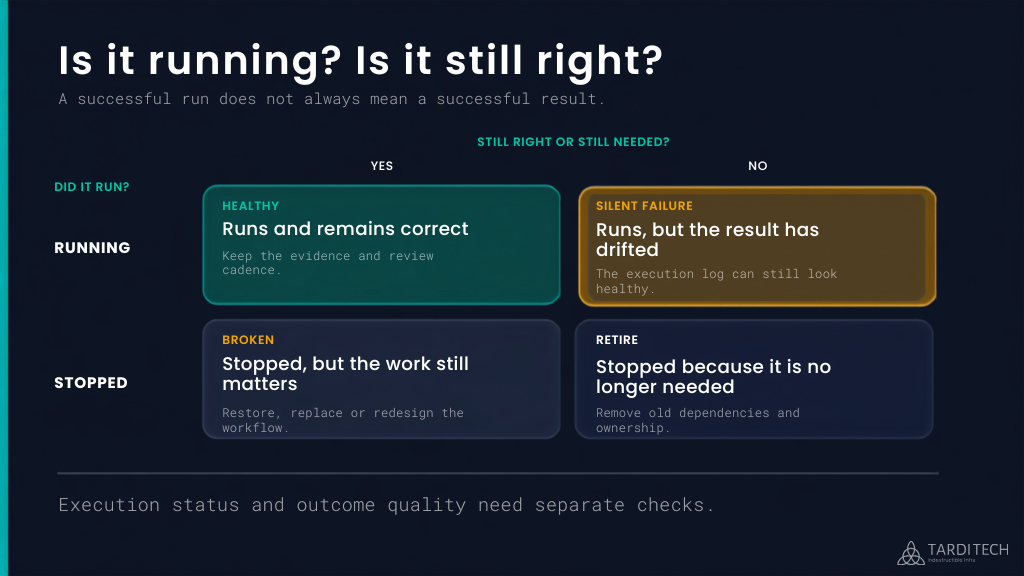
Automation monitoring begins with two questions: did the workflow run, and did it still produce the intended outcome?
Most teams remember when they built an automated workflow. Fewer remember when they last reviewed it. That is understandable. Automation earns its place by removing routine work from someone’s list. Once the task disappears, attention moves elsewhere. The same quality that makes automation valuable can also make drift harder to notice.
Execution metrics answer useful questions. Did the workflow start? Did it complete? Did it return an error? These checks can show that the mechanism still works. They do not, on their own, show whether the result still supports the intended outcome. A workflow can complete successfully while using an outdated signal, applying an old threshold or acting on assumptions that no longer match the environment.
This creates four possible states. A workflow can run and remain correct, run and produce the wrong result, stop after it is no longer needed, or stop while the work still matters. The hardest state to spot is the second one because the system continues to look healthy.
Where drift shows up
Consider a worker pool that scales on CPU utilisation. When the team creates the policy, CPU usage may represent demand well. Six months later, the workload depends more heavily on queue processing or an external API. CPU remains within range, so the scaling rule continues to evaluate and execute without errors. Jobs still wait longer because the original signal no longer represents the outcome the team cares about.
A useful review would compare the scaling action with how long jobs wait in the queue, processing time, service responsiveness and cost. The execution log still matters, but it becomes one part of the evidence rather than the final answer. DevOps and platform engineering teams need to keep that relationship visible as workloads change.
Cost and security can drift too
Cloud cost can drift in a similar way. A budget alert may trigger exactly at the threshold someone set. Meanwhile, the team has added services, changed traffic patterns or moved workloads between environments. The alert still works, but the threshold may no longer help the team understand whether the change was expected or worthwhile.
A financial review needs current cost and usage data, a named owner and enough workload context to explain what moved. UmbraFin gives teams a current view of cost and usage, helping them see where to investigate first. The team still decides whether the change supports the intended outcome and whether the policy needs adjustment. FinOps consulting can help connect that evidence with ownership, governance and ongoing cost decisions.
Security reviews also capture a point in time. New subdomains appear, test environments remain online and temporary ports stay open after the work that required them has finished. An external scan can surface externally visible findings at the time it runs. Web Security Auditor supports that evidence-gathering step. It does not replace a wider security assessment or decide which findings matter most to the organisation.
Build the review into the workflow
A useful automation review needs more than another dashboard. It needs a feedback loop that connects the original purpose of the workflow with evidence from the environment around it.
- Intent: Define the outcome the automation should protect or improve. A scaling rule may need to keep a service responsive while avoiding unnecessary capacity. A cost alert may need to make an unexpected change visible early enough for someone to investigate.
- Run: Record what the automation does, what triggers it and which systems, data and permissions it depends on. This gives the team a clear boundary for the review.
- Evidence: Separate execution evidence from outcome evidence. Logs, completion rates and errors show whether the workflow ran. Service performance, queue time, cost movement, exception rates or review accuracy show what happened as a result.
- Review: Assign someone to examine the evidence and agree when that review happens. Higher-impact or fast-changing workflows need more frequent attention. Stable, lower-impact workflows may need less. Reviews should also follow meaningful changes to workload, dependencies, permissions, input data or business targets.
- Adjust: Give the owner authority and a clear route to keep, update, pause or retire the workflow. A review that identifies drift without leading to a decision only records the problem.
Teams do not need to rebuild every existing automation before they can apply this model. Start with a short review record that names the intended outcome, the available evidence, the owner, the review timing and the most recent decision. That creates a baseline and exposes what information is still missing.
AI-assisted workflows need the same discipline
AI-assisted workflows raise the same operating question. More execution can move into an agent, but accountability for the result still belongs to the organisation using it.
Microsoft’s 2026 Work Trend Index describes organisations that capture lessons from completed work and build them back into shared practice as Learning Systems. It also reports that active agents in the Microsoft 365 ecosystem grew 15 times year on year. As that activity grows, the report argues that evaluation infrastructure must keep pace.
Microsoft reduces the challenge to three responsibilities: assign someone to evaluate agent performance, give the appropriate owner authority to change the workflow, and turn useful local lessons into shared organisational practice.
Together, these responsibilities make oversight part of day-to-day operations. Teams need evidence of quality and exceptions, a named owner who can change the workflow and a shared place to record what they learn.
This is the approach behind TardiTech’s AI automation and AI-assisted systems work. We define the intended outcome, keep people involved where judgment matters and improve the workflow as the surrounding work changes.
Review one workflow that still looks healthy
Choose one automated workflow that appears healthy and has not been reviewed in the last quarter. Avoid starting with the one that recently broke. Start with the one everyone assumes is fine.
Ask five questions:
- What outcome should this workflow produce?
- Which evidence shows the result, rather than only the execution?
- What has changed around the workflow since the team built or last reviewed it?
- Who owns the review and has the authority to change the workflow?
- What should trigger the next review?
If the team cannot name the intended outcome, the evidence and the owner without beginning a new investigation, the automation is missing a clear feedback loop.
Good automation reduces routine work without making the outcome invisible. If your cloud rules or AI-assisted workflows are running without clear evidence, ownership or review points, talk to TardiTech. We can help build those controls into the system and keep them practical as the surrounding work changes.